
Check the cart before the holiday rush
Four GA4 ecommerce events on a demo notebook: view_item, add_to_cart, begin_checkout, and purchase. What the payload has to carry, how a transaction id dedupes a replay, and why consent still comes before the holiday rush.
The holiday rush multiplies the measurement problems a store already has. The Friday after Thanksgiving is 27 November this year. The four events under a cart are still view_item, add_to_cart, begin_checkout, and purchase. Miss a transaction id, a currency, or the item array, and the revenue number is a guess. A rule that says someone bought the notebook is only as trustworthy as that payload.
The ecommerce lab is a demo store with one product, a field notebook that is not for sale. Place demo order does not take a payment.
What each event has to carry
Google's Measure ecommerce guide puts products on an items array for viewing item details, adding an item to a cart, starting checkout, and completing a purchase. The recommended events reference is the parameter list. items is required on all four events. transaction_id is required on purchase. value is marked required for meaningful reporting. currency is required when value is set, as a three-letter ISO 4217 code, so revenue metrics can be computed accurately.
Set value to the sum of price * quantity, and leave shipping and tax out of that sum. On purchase they are separate parameters. Each item needs item_id or item_name; the guide recommends both. Omitted quantity defaults to 1. The array can hold up to 200 items, plus up to 27 custom parameters on an item.
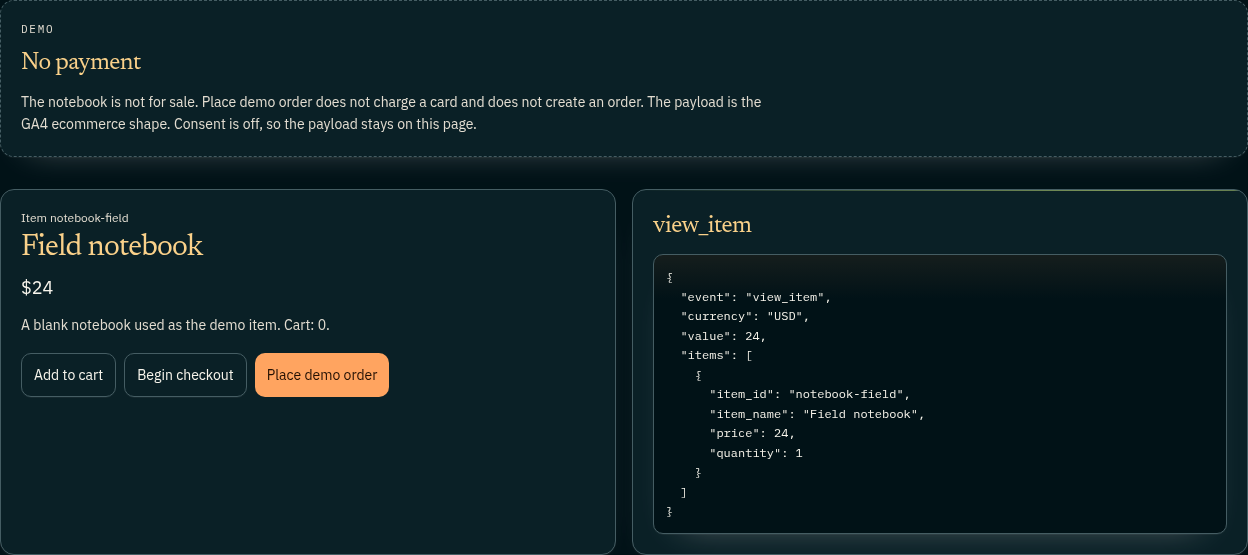
On the lab, value is that price times quantity. There is no shipping and no tax.
{
  "item_id": "notebook-field",
  "item_name": "Field notebook",
  "price": 24,
  "quantity": 1
}
Every step carries currency set to USD and value set to 24.
The transaction id
Minimize duplicate key events with transaction IDs calls a transaction ID a unique identifier for each transaction, such as an order confirmation number. Google Analytics then deduplicates purchases registered with the same transaction ID. The page says that is how you deduplicate transactions from the same user, and that the same ID should not be used across different users. Letters, numbers, dashes, and spaces are allowed. Anything that could identify a customer is not.
An empty string is a trap. Analytics deduplicates every purchase with transaction_id="", so a blank id collapses unrelated orders. The value also has to change per order. A tag that sends one ID for every transaction undercounts. The events reference says the same thing in a line: transaction_id is required on purchase, and it "helps you avoid getting duplicate events for a purchase."
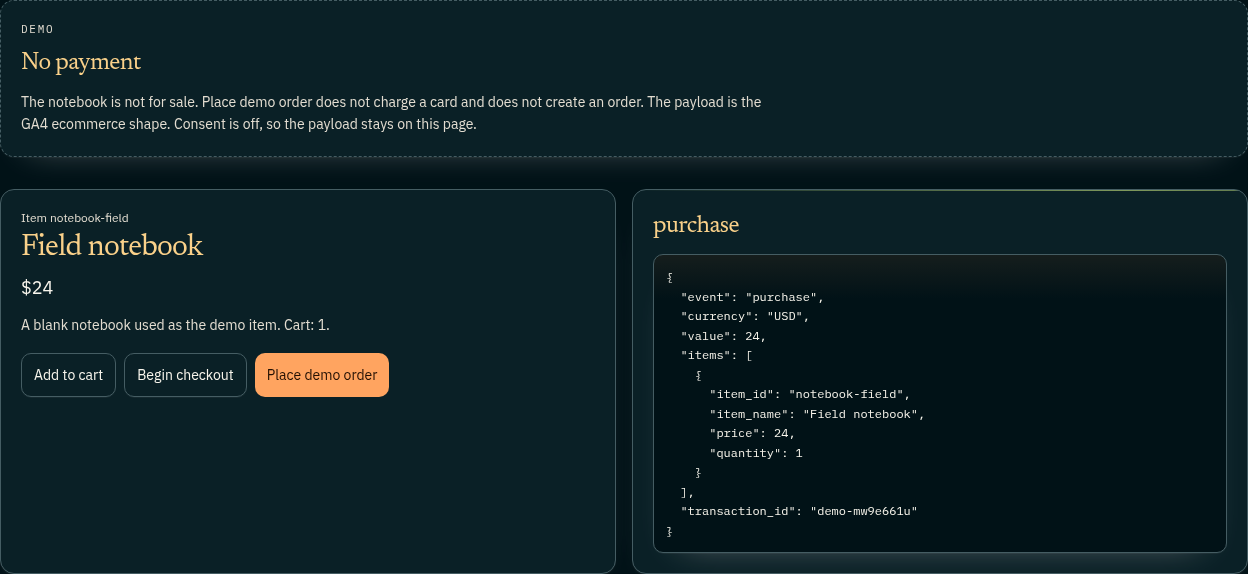
The lab adds the field only on purchase. Place demo order sets it to demo- plus the current time in base 36, so a second press mints a new id. A real order should keep its order id. A second view of the confirmation page should send that same id or skip the push. Fire purchase once and let the documented dedupe cover a replay from the same user. The capture below was taken with measurement declined, so the JSON stayed on the page.
Consent decides whether the push happens
The JSON is drawn either way. The push waits for consent. view_item runs once, after measurement consent is granted. The buttons still change the on-screen step when consent is off. Begin checkout stays disabled until the cart holds the notebook. Place demo order stays disabled until checkout has started. Consent on pushes the same object to the dataLayer.
Accepting later sends that one view_item. It does not replay cart or checkout clicks made while consent was off. Those pushes happen only when the click already finds consent granted. From a push to a Google hit follows the array to a request. The consent lab is the gate: the Google tag is not requested until Accept, and advertising storage stays denied after it.
Check the paste before the weekend
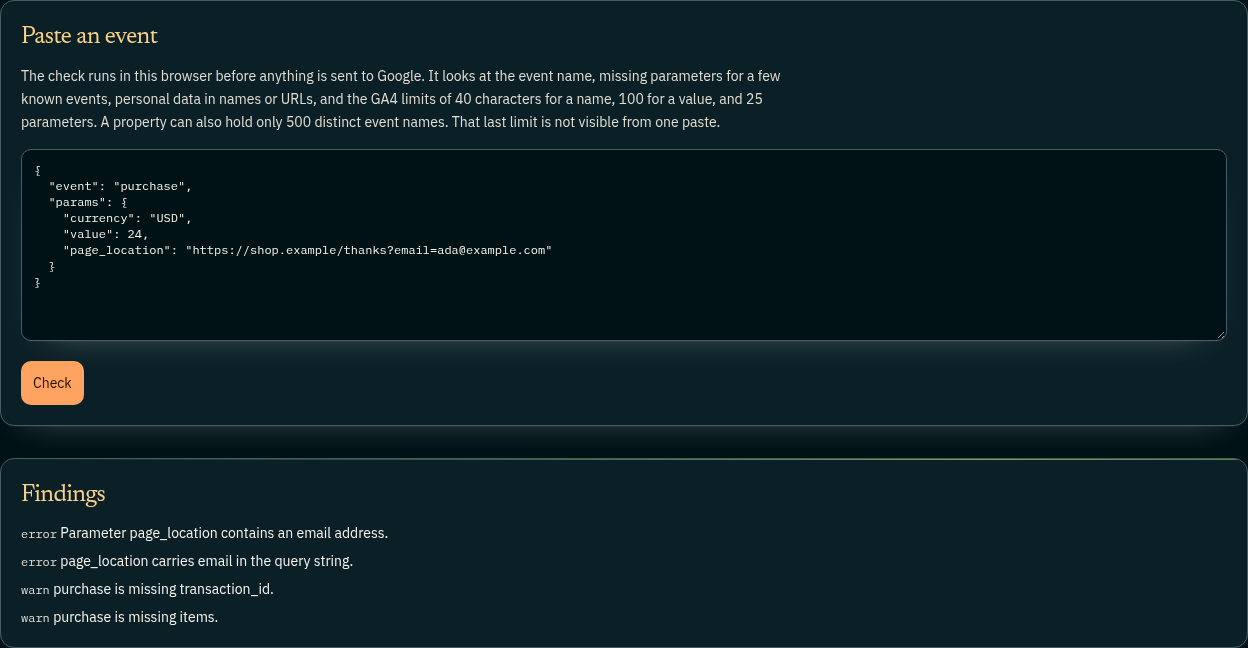
The event quality lab lints a payload in the browser. The paste is not forwarded. The starter purchase puts currency, value, and page_location of https://shop.example/thanks?email=ada@example.com under params. Check warns that transaction_id and items are missing, and it errors twice on the email: the string contains an address, and the query parameter is named email.
A currency that is not three uppercase letters is an error, and so is an items value that is not an array, or a parameter named like an email, a phone, or a card number. Google's best practices on personally identifiable information say no data should be passed to Google that Google could use or recognize as personally identifiable information, including an email in a URL path or query parameter. The starter includes one on purpose.
The same check applies Google's event collection limits: 40 characters for an event name, 40 for a parameter name, 100 for a parameter value (longer for page_title, page_referrer, and page_location), and 25 parameters on one event. The lab's copy also says a property holds only 500 distinct event names. The help page scopes that 500 to app data streams, per app user. Web streams have no such cap. On a website, 40, 100, and 25 are the limits a paste can trip.
The ecommerce lab prints currency, value, and items beside event. The checker reads params, event_params, or a gtag-style array. Paste the lab JSON unchanged and it warns that those fields are missing, because it never looks beside event. Move them under params before you trust the warnings.
Why the payload is the personalization
A slot that changes because someone bought a notebook is quoting item_id. Two transaction ids for one order invent a second buyer. A missing items array is revenue with no product. A value that includes shipping no longer matches the documented sum. A hit sent before Accept was not granted.
The "Why am I seeing this?" panel on the home page names the rule behind a slot. The Why lab documents that control. The label is only as honest as the events under it.
Try it
- Open the ecommerce lab, decline measurement, and read
view_item:notebook-field,USD, and 24, with the payload still on the page. - Add the notebook, begin checkout, and place the demo order.
purchaseshould add atransaction_idthat starts withdemo-. - On the event quality lab, press Check, then paste that purchase under
paramswith the email removed. - On a store you run, repeat the four events against a real order id before 27 November, and reload the confirmation page once.
Sources
Labs that show this
- GA4 ecommerce events, demo store
GA4 ecommerce events, demo store. View, add to cart, begin checkout, and purchase show the payloads. Nothing is charged. Free to click each step.
- GA4 event quality checker
GA4 event quality checker. Paste a dataLayer push and see bad names, missing parameters, personal data, and size limits. The paste is not forwarded.
- Consent Mode and Global Privacy
Consent Mode and Global Privacy Control on this site: what is sent before Accept, what changes after, and how a GPC signal keeps measurement off.
Recommended next
Why these picksReading path transitions…